Tuesday, May 27, 2014

Read Multiple values through XOG


<?xml version="1.0" encoding="UTF-8"?>
<NikuDataBus xmlns:xsi="http://www.w3.org/2001/XMLSchema-instance" xsi:noNamespaceSchemaLocation="../xsd/nikuxog_read.xsd">
  <Header version="13.2.0.472" action="read" objectType="project" externalSource="NIKU">
    <args name="include_tasks" value="true"/>
</Header>
  <Query>
      <Filter name="projectID" criteria="OR">Bala123,Bala1234</Filter>
  </Query>
</NikuDataBus>


OR is differentiating factor to retrieve multiple values.

Content XOG


you can use content XOG for read and write, look up dynamic look up, menus.

Also as part of installation will be covered.

Example XOG user Access - Resource


Back Ground Service (Clarity BG Service)

The following will be  run under back ground service

1. Jobs
2. Process Engine.

Clarity 13 Clarity Solution Pack

Hi

Clarity solution pack need to install in order to view the clarity out of box reports.

Prerequisite for CSP is PMO accelerator need to install.


In order view the report , BO must be installed

Also moving the BIAR(Report extension) from one server to another, you can use Import wizard

for more information you can refer solution pack overview document from CA.

Clarity 13 Certification Preparation

You need to read below document from CA.

1. Installation Guide
2. Studio Configuration.

Reading and Writing XOG using Windows Client in Clarity 13

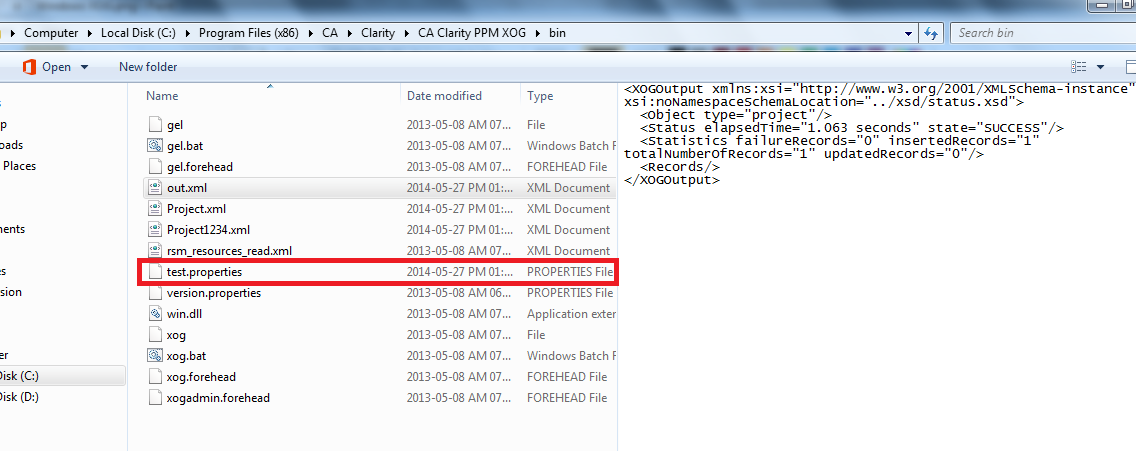
1. Install windows installer for XML gateway


2.after installing you can find the installer created bin folder.
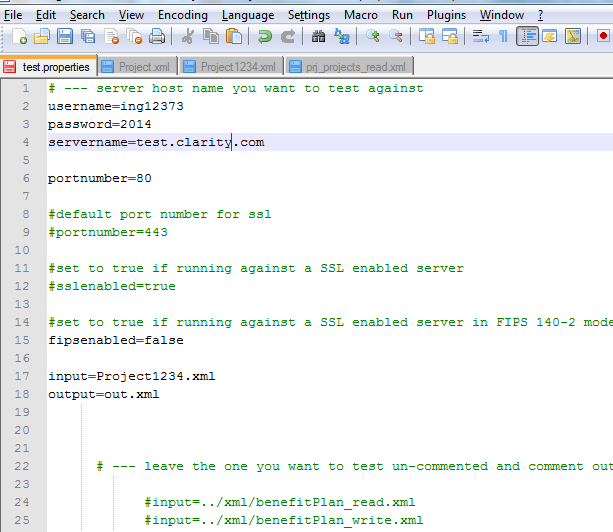
3. configure input xml and output xml in the properties file 
Note: You can specify multiple input file, but only one out put file.

4. Execute below command 


URL Tools in Clarity

Flushing the Cache 
http://{Server}/niku/app?action=security.caches
http://{Server}/niku/nu#action:security.caches


A : This undocumented page in the Clarity GUI allows the administrator to clear the application
caches, either selectively or all-at-once. Using this page is an alternative to the trusted
"start and stop" the app services method of picking up configuration changes or forcing the system
to refresh pages from the application server.

Whilst this is "unsupported" by CA, it is generally accepted that this functionality can be used. The
alternative to using the hidden functionality is to "stop and restart" the app service.

The functionality can be accessed by administration users in all current versions of Clarity (7.5.x to 12)


Q : Running XOG from the Clarity Application URL 
http://{Server}/niku/app?action=xog.client
http://{Server}/niku/nu#action:xog.client

NOTE From v13.3 this hidden page has been removed from the GUI (for performance/stability reasons) - see this thread for some detail.

A : This undocumented page provides a simple XOG client. Type (paste) the XOG XML into the
top window, press "Run" and the output will appear in the lower window.

You should NOT build any integration solutions that rely on this screen, the normal XOG functionality
is the only CA-supported way of integrating data to Clarity.

The functionality can be accessed by administration users in all current versions of Clarity (7.5.x to 13.2)


Q : Viewing / releasing locks 
http://{Server}/niku/app?action=security.locks
http://{Server}/niku/nu#action:security.locks

A : This undocumented page provides an overview of all system "locks".
For example "Import Export Lock" is a project that is currently locked (being editted in OWB/MSP),
the other available lock types refelect system functionality.

(This screen is displaying the contents of the PRLOCK table)

But you should NOT really be "clearing locks" using this screen unless explicty directed to by CA-Support


Q : Viewing the LOG Files from the application 
http://{Server}/niku/nu#action:security.logs

A : This page in the Clarity GUI allows an admin user access to the server log files without having to access the CSA

This functionality can be accessed by administration users in only the later versions of Clarity (i.e. starting v13) and only on TOMCAT installations.
Using this "hidden page" should not replace normal access to log files through the CSA or directly on the server itself.


Q : Web Services Interface (WSDL) 
http://{server}/niku/wsdl

A : This page is the starting point of the system documentation for the web-services provided
by your application. CA-provided actions/queries will be found here, along with any custom
NSQL queries you have built. All are available to be call via a web-service from YOUR web-service
enabled client. Of course it is up to YOU / your systems integrator to "code" the client end of this
relationship.

This page is documented is the CA-provided "Integration Guide"

Clarity 13 Tips:

OBS you can make as a required field in Clarity 13 Version

XOGGING different way in clarity

1. Xog UI Client (Which is not applicable after 13.2)
2. XOG Client (Windows and you can use below two command )
      1. XOG Command
      2. Run command
3. XOG Logger

Clarity 14 - New upcoming Feature

You can create your own addins and install in QA and Production.

For example

Portlet (you can create custom Addins)

Upload/Xogging Order in Clarity PPIM

1. Partition
2. OBS
3. Users
4. Resources
5. Billable
6. Chargecodes
7. Projects
8. Activitylevelcodes
9. tasks
10. Team
11.baselines
12.taskactivity

CA Clarity Encryption for Properties XML

In CSA, you can encrypt your password with in properties.xml by using below option


Thursday, May 22, 2014

License Types in Clarity

They are two types of licence in Clarity 

1. Team member 
2. Manager 

Team member contains the below type of access.

Viewer 
- Participant 

Manager contains the below type of access.

- Creator 
- Studio Developer


Sunday, May 11, 2014

How Clarity Integrated with Microsoft Project

Step 1:
The below interface software need to download in order to work with Microsoft project from Clarity environment.


Step 2:

Select Project from project view, which you want open in MSP and choose schedule format attributes (Clarity Supports Microsoft project & Open work bench). 


Step 3:
After done above steps. Click on Go button which is marked below screen and now the project will open in MSP and start working with MSP.


Thursday, May 8, 2014

Get all the OBS details in this table: nbi_dim_obs


select PATH, LEVEL0_NAME,LEVEL1_NAME,LEVEL2_NAME,LEVEL3_NAME,LEVEL4_NAME,LEVEL5_NAME,LEVEL6_NAME,LEVEL7_NAME,LEVEL8_NAME,LEVEL9_NAME,LEVEL10_NAME  from nbi_dim_obs where OBS_Type_Name='Financial Department'
order by Level1_Name 

Wednesday, May 7, 2014

Clarity 13 Recent Page View

Hi

I have found one of the great change in the User interface of Clarity 13, now you can see all the recent view pages in the marked below link. Attached image for the reference

Tuesday, April 8, 2014

What is NSA in Clarity

When you install, upgrade, configure and monitor Clarity, you will use Clarity Niku System Administration application to perform most of these tasks. If you implement cluster of clarity server, you will run NSA in the master.

You can use NSA to distribute themes, XDM, and other files to the remote servers.

Important

If you have implemented a cluster of clarity servers, the beacon service should always be running on each server in the cluster. If the beacon is not running the server will not be accessible to NSA

Creating New Themes using Clarity NSA

You can create your own theme in  Clarity by using Niku System Administration (NSA)
Please Login NSA in Clarity to create new themes, also you can make active/inactive of your existing themes.


What is a Portlet

Portlets are snapshot into Clarity data. Portlets can be graphs, tables, or web page snippets.

Menu Manager Using Clarity

Use Clarity Studio to Add Menu's using Menu Manager Link.

Page Name: This is the attribute will be used to connect the object which you created in the Object section of Administration page.

=>Menu Manger will help to reorder the existing menu's

Monday, April 7, 2014

Create Partition Using Clarity

Coming Soon.

Create Object in Clarity

I have learned how to create objects using Clarity Studio in clarity and to use the same in Clarity application side a as a new webpage.This is really amazing and i didn't write single line of code to enable this page, where in Past and I used to write lot of coding to do this kind of page in web. This is really amazing feature from CA.

Create Object using in Clarity Studio from admin.


Object Configuration.


Please find the screen shot how it will be reflected in application side, when you enable the option from object.


Important: Event Not enabled option is not selected, then you can't execute the process for this object.

Document Search Using Clarity Tool Bar

They are three tool bar available in clarity .

1. Clarity Tool Bar.
2. Page Tool Bar.
3. Section Tool Bar.


1. Use the Clarity tool bar to search document with in clarity instance. (It's available top of the page)

2. Page Tool Bar

Lists and Filters using Clarity

Lists and Filters
They are multiple option available in the filters.

1.Save Filter


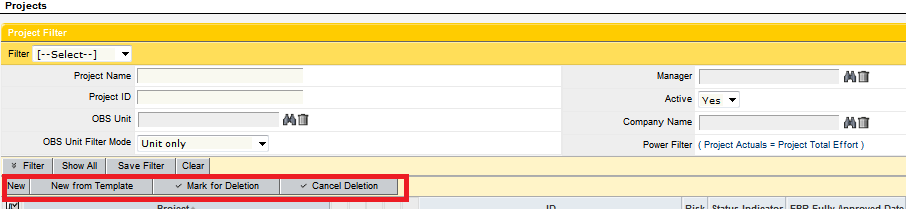
2.Create Filter Expression using Power filter,


Example: Project Actuals == Project Total Effort


Power filter Query.


3 Filter action bar


4. Object Action Bar


5. Minimize the filter and change the focus to the list view.


What is Clarity?

Clarity is a Project Management tool and it delivers all the capability of Project Portfolio and Innovation Management.
Clarity is top-down portfolio planning analysis with bottom-up project, program, financial and process management.
Clarity gives executives real time view into their organization's investments, initiatives and resources, and empower managers to deliver controlled and predictable execution of project and programs.

                 The Clarity application is comprised of nine modules, five of which are used by people throughout  your organization, while the others are used to configure and extend the system, automate the process and workflows, and seamlessly integrate with adjacent systems.
Clarity Modules are as follows.
1. Portfolio Management
2. Project Management
3. Resource Management
4. Demand Management
5. Financial Management
6. Process Management
7. Schedule Connect
8. Service Connect
9. Clarity Studio

Basic levels of Navigation in Clarity 12

The Clarity user interface has the following basic levels of navigation.

1. Main menu


2. Tabs and sub tabs


3. Content menu


4. Page Tool Bar.
5. Clarity Tool Bar


Sunday, April 6, 2014

How to create Dashboard in Clarity 12


Step 1:

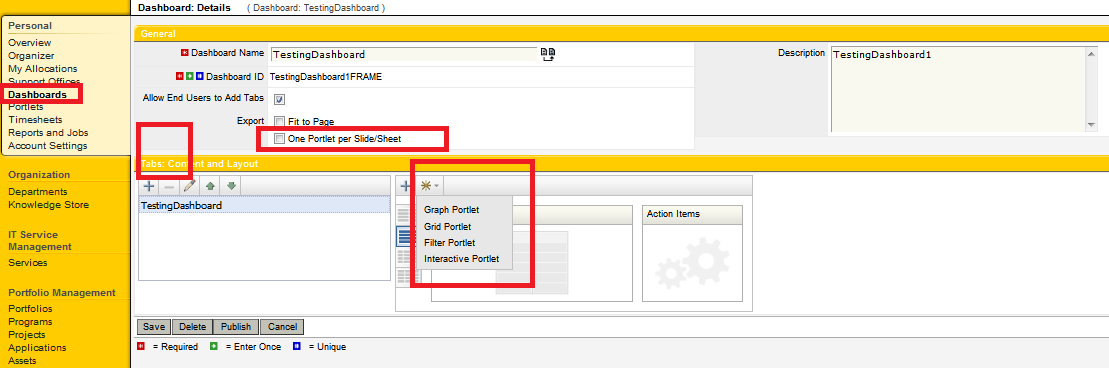
Create new Dashboard by using Application view in clarity


Note:  With out portlet, there is no value to create dashboard. so chose existing portlet or create new one to use dashboard.

The below options are available in Dashboard.

1. End user can add the tab by own.
2. Fit to page.
3. one portlet per slide/sheet.

=>Also you can add more number of portlet under dashboards.
Dashboards title can be translated in to 15 different language. Please use the translate button to change the text.


Tuesday, April 1, 2014

What is Charge back Allocations in CA Clarity PPM

Coming soon.

CA Clarity Security Model

In Clarity PPM, they are three level of granularity at security model.

1. Instance Based

This is where user has specific instance access rights.
Example: Specific Project

2. OBS level

Based on the organization structure that has been defined for your company and linked to many objects inClarity PPM.


3. Global

Allows users access to all the instances of a particular project or an defines the area of an application they can see.


Tuesday, March 25, 2014

Custom object XOG

<NikuDataBus xmlns:xsi="http://www.w3.org/2001/XMLSchema-instance" xsi:noNamespaceSchemaLocation="../xsd/nikuxog_read.xsd">
  <Header version="8.0" action="read" objectType="customObjectInstance" externalSource="NIKU"/>
  <CustomObjectInstanceQuery>
    <Filter name="objectCode" criteria="EQUALS">z_interfaceconfig</Filter>
    <Filter name="instanceCode" criteria="OR">00005234</Filter>
  </CustomObjectInstanceQuery>
</NikuDataBus>

Object code : Object ID


Thursday, March 20, 2014

Default selection using Clarity for Look up.

If want to change look up value default attribute in clarity need to change in two places.

1. Attribute level.
2. View Level.


How to do the assignment for resource to start the work on specific task using clarity

Use the above image to assign the resources to specific task with your time line.

How to Add Dependency Task for Tasks

Click WBS for one of the project in Clarity and follow below steps.

1. Use Link to add Dependency task
2. You can find the dependency task which created using above step. (Successor)
3. You can find the dependency task with Predecessor